
How to setup E-Faxing
Published: 4/10/25 7:38 PM
Modified: 4/10/25 7:38 PM
Category: EyeMD EMR 2.0, Installation - 2.0
Before you begin, you will need the API key and Fax number for the practice. You will be provided this by customer service.
- From the Hamburger Menu go to Options>Integration>Interface Options
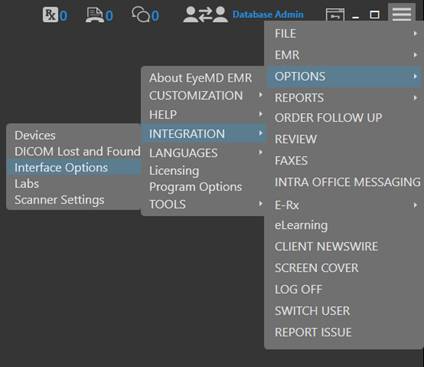
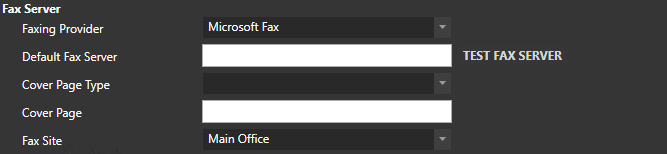
- You will see a section titled Fax Server
- Change the Faxing Provider to Internet Fax, set the Cover Page Type to Server, set Cover Page to generic.cov, set the Fax Site to Which ever location is the Main Office, and set the API key to the one listed above. (PLEASE MAKE SURE THAT THE SITE YOU SELECT MATCHES THE SITE IN WHICH THE GATEWAY MANAGER IS SET TO)
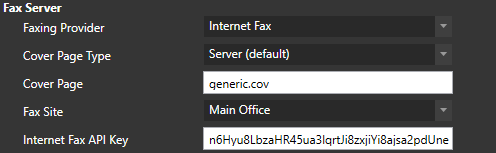
- Once that is completed click save at the bottom

- Now go back to the Hamburger menu and go to Options>Customization>Sites
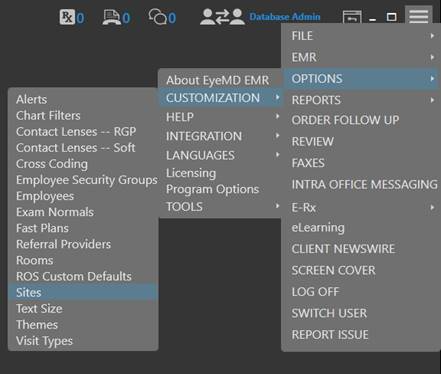
- Enter the Fax number provided above under the Site that it applies to. NOTE: The formatting is very important. It must be entered using the standard Domestic format with the parenthesis.

- Click save at the Bottom and they should now be able to send and receive faxes